Every week, 2fifty Texas BBQ sends a newsletter to almost 90,000 people. It's a restaurant with two locations, one in riverdale park, md and one in washington, dc, and the newsletter is one of its best sales channels. It's also a chore. On a full week it took our designer up to two working days to put one issue together.
That's the tension this post is about. The work is tedious, and it matters. A sloppy issue doesn't fail loudly; it goes out to 90,000 inboxes with a wrong date, a broken link, or an image no screen reader can describe.
This week the first real issue went from the restaurant's website to a client preview in a couple of hours of person time, feedback round included. This is how it works, what's still done by hand, and why we think the result is not only faster but better.
so many moving parts
The email is image-first: designed blocks exported as images, swapped into a cloned email in their email tool, each image with its own link and alt text. It looks like a small editorial magazine in the inbox. Putting it together looked like this:
- Before any design, the client sends a brief. They know what they want to sell more of, the context around it, and even when it should go out to give sales a push.
- Gather the week's specials, news and photos, from the website, a shared drive and chat threads.
- Copy-paste copy that already lives on the website, and adapt it to fit.
- Build twelve to fourteen blocks in Figma from components, fitting the text into each one.
- Export the images and name the files.
- Send a preview to the client and go through revision rounds over chat.
- In the email tool: clone last week's email, upload each image, set each link and alt text, the subject and the preheader.
- Send a test and fix what's off.
Nothing on that list is hard. It's long, and almost all of it is moving things that already exist from one place to another. Most of the newsletter's copy is already on the restaurant's website; someone already wrote it, approved it and published it. Every week, a person typed it again.
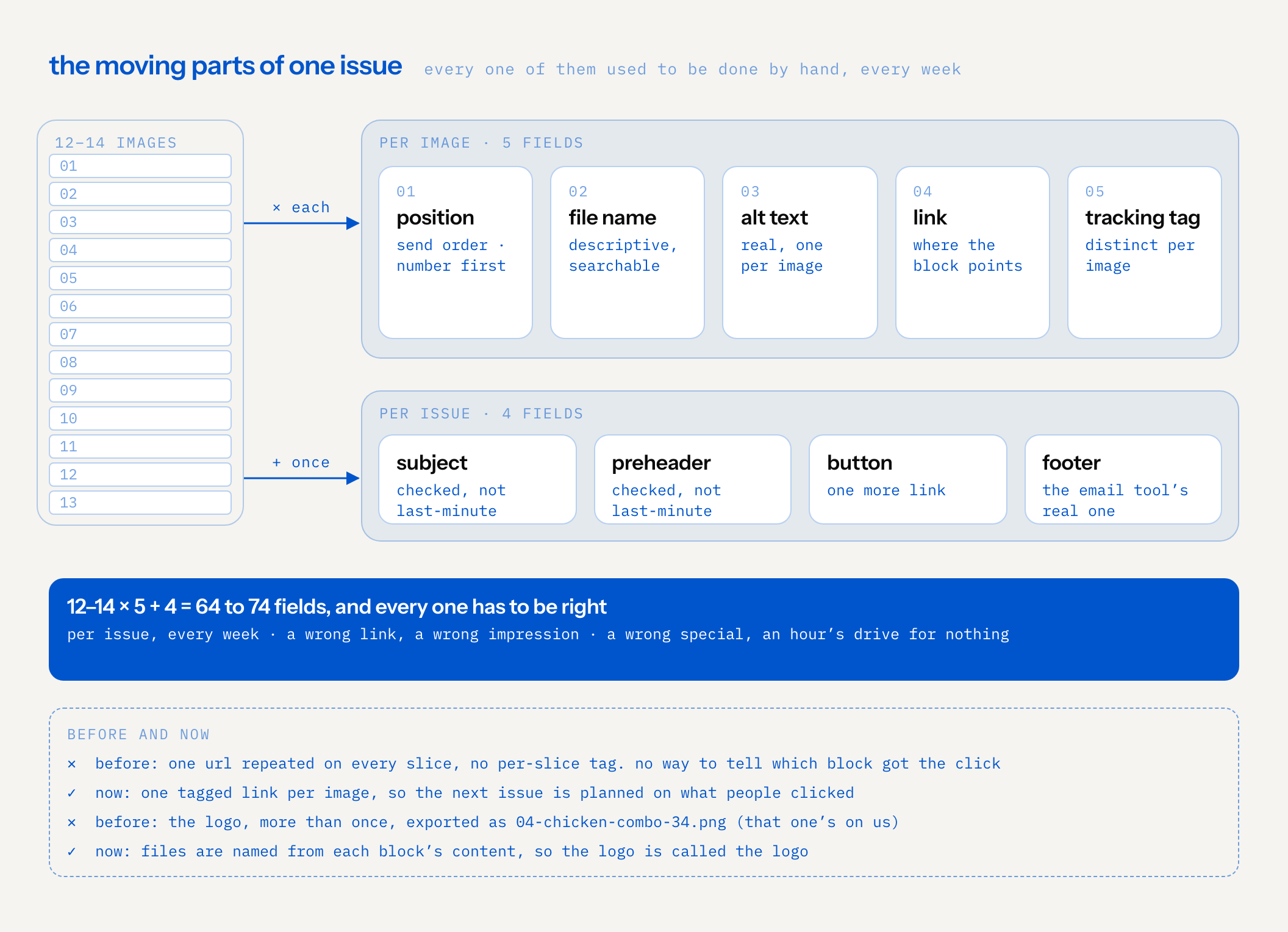
And the moving is where the small things slip. Twelve to fourteen images, each with a position, a file name, an alt text, a link and a tracking tag, plus a subject, a preheader, a button and a footer. That's somewhere around 64 to 74 small fields per issue, every week, at the end of a long day of design. Those are exactly the fields a tired person skips.
And every one of them has to be right, not just there. A wrong link gives a wrong impression. A wrong special sends someone on an hour's drive to find it isn't on the menu.
Some of these parts, honestly, haven't worked for ages, because good file names are hard to make by hand at the end of a long day. We're fairly sure we've sent a couple dozen emails where the logo was called 04-chicken-combo-34.png. That one's on us.
not a template
There are faster ways to make an email. The email tool has its own AI email helper, and there are plenty of templates. Both would have been quicker to set up, and both would have given up the thing the restaurant cares about: a designed, editorial newsletter that looks like them and not like everyone else.
So this is custom. Think of it as a box of legos we designed for 2fifty. The pieces are newsletter blocks: a masthead, a cover for each kind of issue (seasonal, event, holiday, regular), a specials menu card, day tiles, press, a blog teaser, a review quote, pairs-well and catering, each in a few colour themes. Every issue snaps a set of them together in an order, like departments in a magazine, and pours in that week's content. The pieces are designed once, by hand. The building is fast. We call that box the block system, and the skill is built around it, and around how this team already works.
The way we think about it: good BBQ is still a pit and a person who knows it; the best smokers keep the craft and use whatever tools take the guessing out of the rest. Handcraft where it counts, ai-enhanced tools and code for everything around it. We've started calling this kind of work creative AI ops.
what the skill does now
We packaged the whole process as a skill the team shares. It runs in six steps:
- It starts from the brief, then reads the website. Whatever the designer gathered from the client's brief goes in first: what to push, the context, when it should go out. Then the skill reads the specials, the seasonal page and the news on the website to fill in the rest, reusing the copy and the photos verbatim. Anything it can't find stays as a [bracketed] placeholder, and the run ends with a report of what the website is missing.
- It composes the issue on the block system we designed for this client.
- It publishes an editable newsletter page. Reorder, hide or recolour blocks; click any block to edit every field and swap the photo; lock what's done.
- It sends the issue for feedback. It builds a client-facing preview page: what this email is for, the inbox preview, the email exactly as it will arrive (with the email tool's real footer), and every open placeholder turned into a question. The client comments on any block. Round two updates the same link, so the comments stay where they were. Asking "what did the client say?" turns the comments into a change list, applied after approval.
- It exports. Numbered, search-friendly image files in send order (the number goes first, so they line up in order when you pick them), alt text and metadata embedded, a tracking link per image and a build sheet, saved to the project folder and to a shared drive.
- It opens an upload helper. One page with every link, alt text and file at hand to copy while the designer swaps the images into the email tool, with a tick for each one that's done.
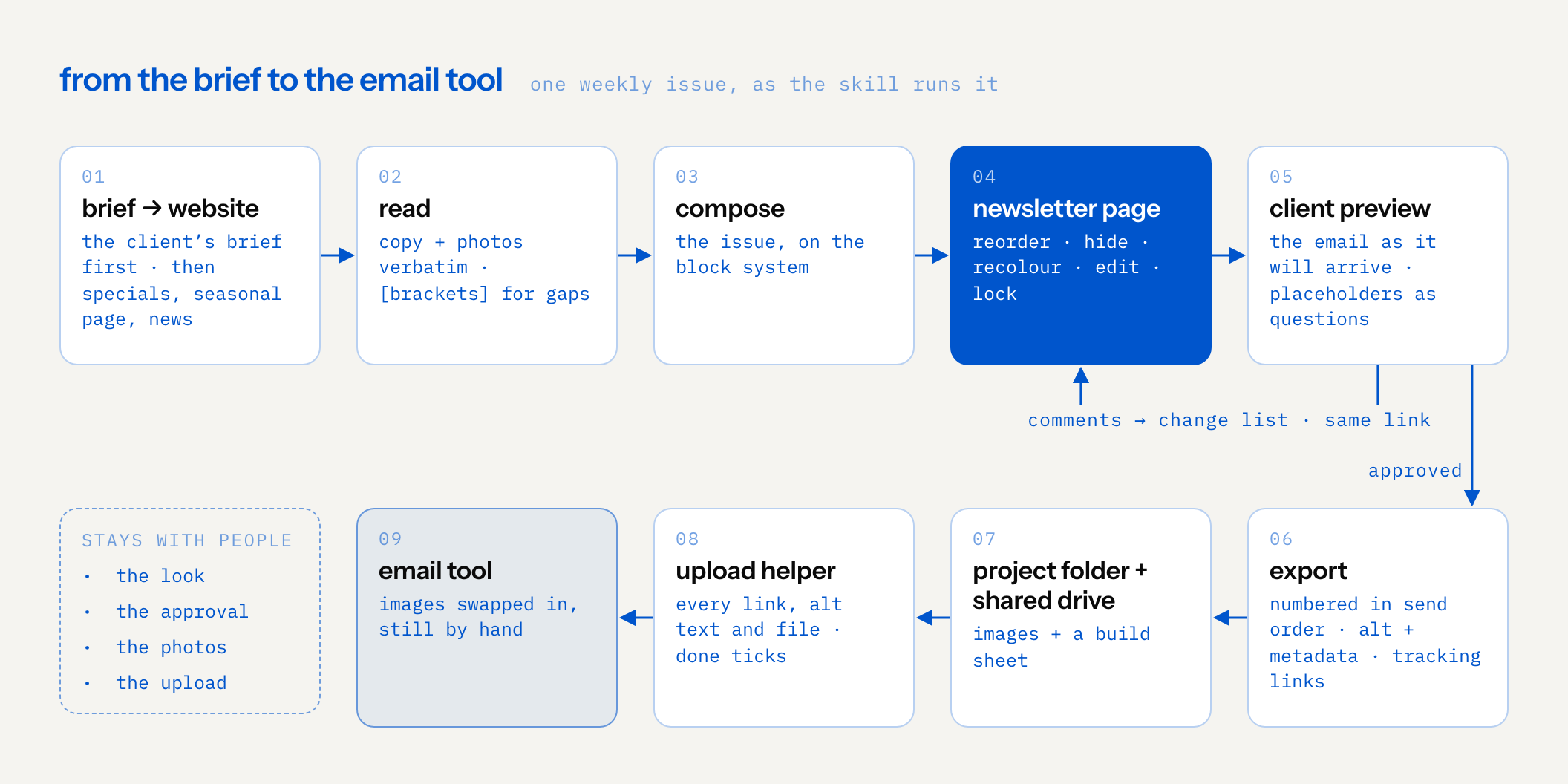
The machine does the moving. The designer still decides what the issue looks like, and the client still approves it. Nobody types a menu twice.
not only faster: better
The hours matter, and we'll get to them. But the part we're most interested in is the other one: the small fields that get skipped when someone is tired now get done every time, because nobody has to remember them.
- Real alt text, per image. Each image gets its own alt text, in the build sheet and embedded in the file. People reading with a screen reader, or with images turned off, get the newsletter too.
- File names that mean something. The skill names each file from its block's content, numbered in send order, number first. The logo is called the logo. They're descriptive enough to find again next month in a drive search.
- A distinct tracking link per image. Before, the same URL was repeated across the slices with no per-slice tagging, so you couldn't tell which block got the click. Now each image carries its own tagged link, and the next issue can be planned on what people actually clicked.
- The subject and preheader get checked, not typed at the last minute.
- Nothing invented. If the website doesn't say it, the issue doesn't either. More on that below.
brackets, never invented
The rule we care about most is the smallest one. A restaurant newsletter is full of details that are easy to make up and expensive to get wrong: a price, a date, holiday hours, which of the two locations has the special. A model will happily fill those in, and it will sound right. On a list this size, one wrong detail reaches a lot of people.
So every field the skill can't source from the website comes out as a placeholder in square brackets, like [price] or [event date]. Three things happen to it:
- It shows up in the run's report as something the website is missing. That list is useful on its own: if the newsletter can't find it, customers probably can't either.
- It can't hide. A bracket inside a designed block looks wrong on purpose.
- In the client preview, it becomes a question. The client answers it in the same place they're already commenting, and the answer goes into the change list.
![decision flow for each field in a block, such as a price, a date, holiday hours or which location: does the website say it? if yes, the copy or photo is reused verbatim and goes into the issue. if no, the field becomes a bracket such as [price], never a guess, which looks wrong on purpose; it turns into a question in the client preview, the client’s answer goes into the change list, and it reaches the issue after approval. every bracket is also listed in the run’s report as missing on the website, probably what customers can’t find there either](/assets/fieldnotes/newsletter-from-the-website/brackets-en.png)
We wrote the same rule down when we rebuilt 24 case studies in an afternoon: only what the source says. The honest version of fast leaves a gap you can see. The dishonest version fills it and sounds great.
the hours
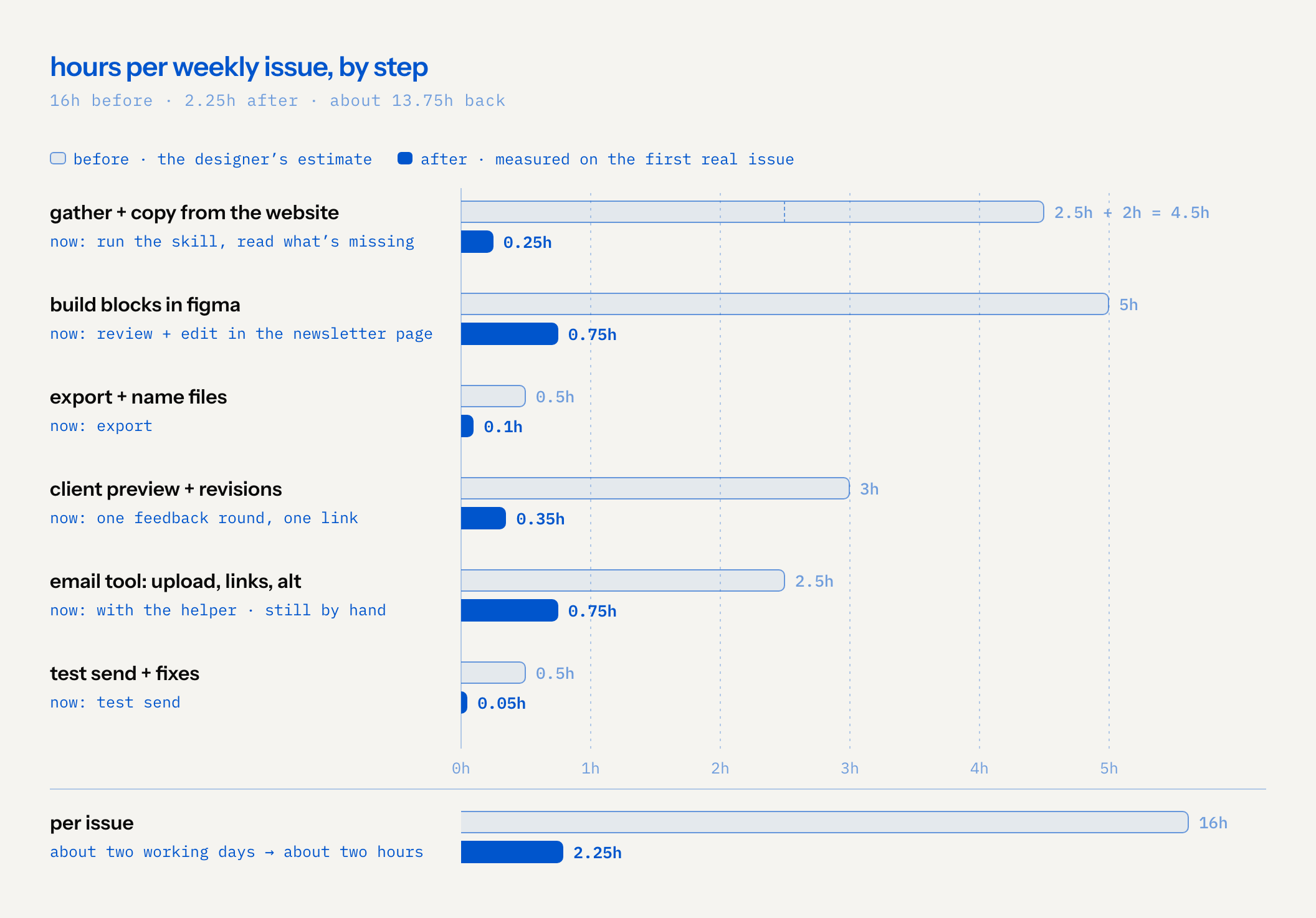
These are estimates from the designer's own week, step by step. The "after" column is measured on the first real issue. One issue isn't a steady state; we'll know the real number after a few more weeks.
| step | before | after |
|---|---|---|
| Gather specials, news, photos | 2.5h | |
| Copy-paste and adapt website copy | 2h | |
| Run the skill, read what the website is missing | 0.25h | |
| Build blocks in Figma, fit text, swap photos | 5h | |
| Review and edit in the newsletter page | 0.75h | |
| Export and name files | 0.5h | 0.1h |
| Client preview and revision rounds (active time) | 3h | 0.35h |
| Email tool: clone, upload, links, alt text, subject, preheader | 2.5h | 0.75h, with the helper |
| Test send and fixes | 0.5h | 0.05h |
| Per issue | 16h, about two working days | 2.25h |
That's about 13.75 hours back per issue, roughly 86% of the time.
The chart also shows where the time is now. The biggest block left is the upload into the email tool, and that part is still by hand.
the year
Per issue, it looks like a nice saving. Over a year it looks like something else. With about fifty weekly issues:
- Before: about 16 hours × 50 ≈ 800 hours a year on the newsletter.
- After: about 2.25 hours × 50 ≈ 112 hours.
- Back: about 690 hours a year.
At 40-hour weeks, 690 hours is about 17 working weeks. Assuming around 46 working weeks in a year, that's roughly four months of a full-time designer's year, a bit more than one week in every three. All of it is estimates: the before column is the designer's own count, and the after column is one real issue multiplied by fifty.
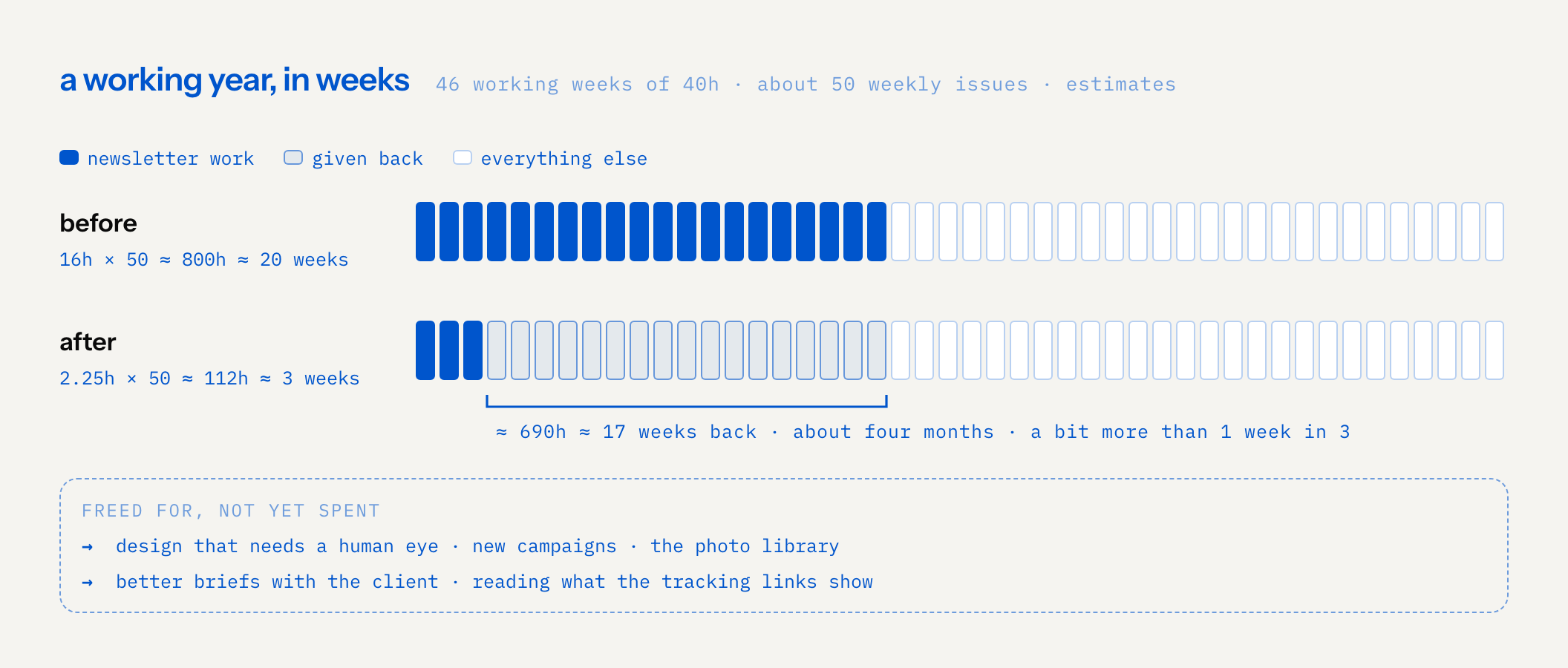
That time isn't spent yet, and we won't pretend it is. What it's freed for is the work a person should be doing anyway: design that needs a human eye, new campaigns, the photo library, better briefs with the client, and reading what the per-image tracking links say about what people actually click.
how we built it
Roughly a day of sessions. We started with a block lab: variations grouped by vibe, the designer locked favourites across rounds, and each new round learned from the locks until it found a middle style between them. That became a kit, the kit became an editor, and the editor became a packaged skill the team can share, with automated tests underneath: 90 Python tests, plus browser tests for the pages. It's the build by accretion loop again, with a client deadline: each layer standing on the one before.
what it doesn't do yet
- The upload is still by hand. The helper page makes it faster and harder to get wrong, but a person still swaps each image into the email tool. It's the biggest block of time left.
- Photos still need a person. The skill reuses the photos already on the website. Someone still has to shoot new ones, or pick them.
- One issue isn't a trend. The after column is one real issue. The first weeks of anything are the weeks you pay the most attention.
- The before column is an estimate. It's the designer's own count of their own week, not a time sheet.
- It only knows what the website knows. Brackets catch what's missing. If something on the website is out of date, the newsletter starts out of date too, and a person still has to catch it in review.
next experiments
Two things are in progress, neither done:
- The brand connector. Plugging in el fin's hosted brand connector (El Fin is a Salvadoran design studio Sam co-founded and a separate company from CAPSLOCK), the same brand-knowledge MCP we stress-tested with synthetic users. With it, the restaurant's voice, facts and visual rules are loaded from the start, so the skill has less to adapt and the copy step gets smaller again.
- A photo database. We're building a tagging and metadata database for the restaurant's photos together with the brand's photographer, Sophie Macaluso. The idea is that the skill can pick the right photo by dish, day and location, instead of a person hunting through drives.
We'll write down what each one changes once we've run it.